 |
Ryan McLaughlin | Mechatronics Portfolio
|


|
|
Ryan McLaughlin | Mechatronics Portfolio
|
|
PC Script for Lab 0x0FF. More...
Functions | |
| def | frontEnd.kb_cb (key) |
| Callback method based on keyboard inputs. More... | |
| def | frontEnd.sendChar (lastKey) |
| Method for sending characters via serial to Nucleo. More... | |
| def | frontEnd.clearFiles (fileNames) |
| Method for deleting files. More... | |
| def | frontEnd.writeCSV (fromNucleo, csvFileName) |
| Method for writing a .csv file. More... | |
| def | frontEnd.createPlot (csvFileName, pngFileName, figureCaption, posCol, speedCol, tRef, speedRef, posRef, Kp, Ki, J) |
| Method for creating a plot. More... | |
| def | frontEnd.sampleCSV (referenceCSV, modified, controllerPeriod) |
| Method for resampling reference data at lower resolution. More... | |
Variables | |
| list | frontEnd.t = [] |
| Reference time list. | |
| list | frontEnd.omega = [] |
| Reference speed list. | |
| list | frontEnd.theta = [] |
| Reference position list. | |
| frontEnd.ser = serial.Serial(port='COM5',baudrate=115273,timeout=1) | |
| Serial port definition. More... | |
| list | frontEnd.callbackKeys = ["s","g","z","p","d","v","x","o","f","w","r"] |
| Define callback keys. More... | |
| frontEnd.callback | |
| callback for keys | |
| frontEnd.lastKey = None | |
| Initial value of last key released. More... | |
| bool | frontEnd.userPrompt = True |
| Boolean variable for displaying UI options. More... | |
| bool | frontEnd.debugFlag = False |
| Debugging flag for print statements in Spyder. | |
| int | frontEnd.Kp = 0 |
| Kp value sent from UI. | |
| int | frontEnd.Ki = 0 |
| Ki value sent from UI. | |
| int | frontEnd.J1 = 0 |
| J value for encoder 1 sent from UI. | |
| int | frontEnd.J2 = 0 |
| J value for encoder 2 sent from UI. | |
| frontEnd.fromNucleo = ser.readline().decode('ascii') | |
| Most recent line read from serial communciation between the PC and the Nucleo. | |
| frontEnd.currentFromNucleo = fromNucleo | |
| Non empty line from Nucleo serial communication. | |
| frontEnd.metrics = currentFromNucleo[1:] | |
| CSV of Kp, Ki, and J values. | |
PC Script for Lab 0x0FF.
This file serves to run the PC (or front end) side of operations for our lab. From this script, keystroke commands are sent to the Nucleo, data is processed into a .csv file, and data is plotted to produce a .png file
See source code here: https://bitbucket.org/ryanmclaug/me_305/src/master/Lab0xFF/frontEnd.py
Example output .csv file here: https://bitbucket.org/ryanmclaug/me_305/src/master/Lab0xFF/outputDataExample.csv
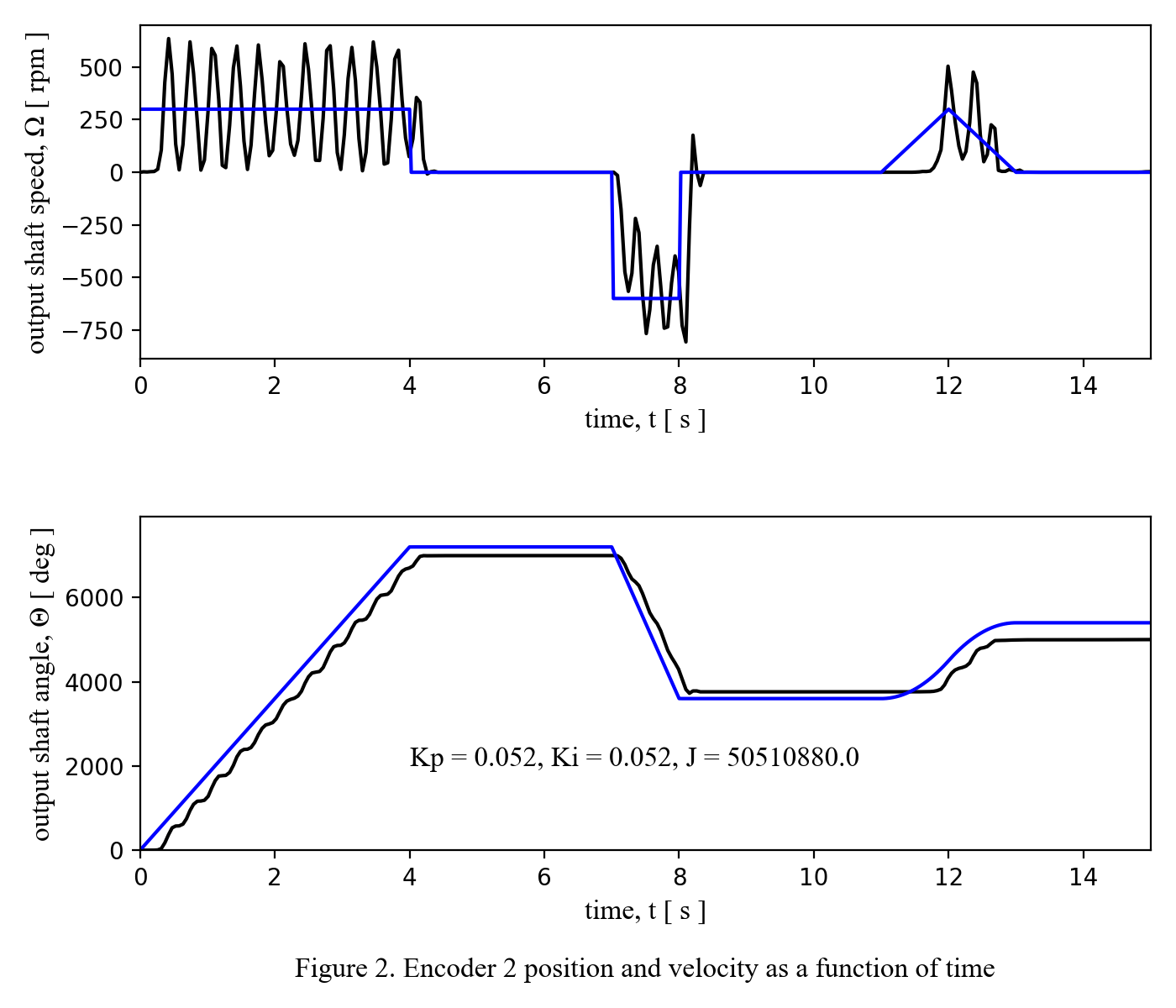
Shown above is an example output plot from frontEnd.py
| def frontEnd.clearFiles | ( | fileNames | ) |
Method for deleting files.
Since the csv writer is set to append to a certain file, the file to be written to must be removed each time the PC collects new data. If it was desired, this could be replaced by a method to rename the next file to write to a new file each time. For this, the os module is used.
| fileNames | is a list of strings containing the various files written each time the frontEnd is run |
| def frontEnd.createPlot | ( | csvFileName, | |
| pngFileName, | |||
| figureCaption, | |||
| posCol, | |||
| speedCol, | |||
| tRef, | |||
| speedRef, | |||
| posRef, | |||
| Kp, | |||
| Ki, | |||
| J | |||
| ) |
Method for creating a plot.
This method utilizes the matplotlib module to plot data from a .csv file created earlier. The .csv file is used for plotting in conjunction with the numpy module, and then the plot is saved to a .png file in the working directory.
| csvFileName | is the specified file name of the output .csv file |
| pngFileName | is the specified file name of the output .png file |
| figureCaption | The desired caption for the plot |
| posCol | Column in output csv file containing speed data for the appropriate encoder |
| speedCol | Column in output csv file containing position data for the appropriate encoder |
| tRef | Refrence time data |
| speedRef | Reference speed data |
| posRef | Reference position data |
| Kp | Gain value for speed feedback |
| Ki | Gain value for position feedback |
| J | Performance metric |
| def frontEnd.kb_cb | ( | key | ) |
Callback method based on keyboard inputs.
In order to use the keyboard to set certain tasks into motion, a callback is used, along with the keyboard module for python. Only an "s" or "g" will be able to trigger the callback.
| key | is the key released by the user |
| def frontEnd.sampleCSV | ( | referenceCSV, | |
| modified, | |||
| controllerPeriod | |||
| ) |
Method for resampling reference data at lower resolution.
This method uses the numpy library to resample a refrence data set for reference tracking. Instead of loading in every line of a given csv file, an increasing number of rows are skipped over, and a single line is read each time through the loop, creating a lower resolution data set (so that memory issues do not occur on the Nucleo).
| referenceCSV | Original file name |
| modified | Modified file name |
| controllerPeriod | Needed to determine at what rate to resample |
| def frontEnd.sendChar | ( | lastKey | ) |
Method for sending characters via serial to Nucleo.
sendChar writes characters from the PC to the Nucleo by encoding as ascii characters, then decoding
| lastKey | is the last key released on the keyboard. |
| def frontEnd.writeCSV | ( | fromNucleo, | |
| csvFileName | |||
| ) |
Method for writing a .csv file.
As data is being transferred from the Nucleo to the PC, we want to append this data to a .csv file for later use/analyis. Initially, the string is already in a csv type format, but to write it to a csv file, we need to strip the string of line endings, split it on commas, convert to type float, then append a new row to the .csv file.
| fromNucleo | is the string read from uart for a given iteration |
| csvFileName | is the specified file name of the output .csv file |
| list frontEnd.callbackKeys = ["s","g","z","p","d","v","x","o","f","w","r"] |
Define callback keys.
Using keyboard.on_release_key with "s" and "g" to implement callbacks from key presses
| frontEnd.lastKey = None |
Initial value of last key released.
Setup such that key press callback is only checked if lastKey is not None.
| frontEnd.ser = serial.Serial(port='COM5',baudrate=115273,timeout=1) |
Serial port definition.
Need to specify the port to use for serial communication, as well as a baud rate
| bool frontEnd.userPrompt = True |
Boolean variable for displaying UI options.
Intitially set to True, the user prompt message is displayed following any key press to inform the user of possible options
 1.9.0
1.9.0