 |
Ryan McLaughlin | Mechatronics Portfolio
|


|
|
Ryan McLaughlin | Mechatronics Portfolio
|
|
Simple program using button press to cycle through three different LED patterns. More...
Functions | |
| def | ledpwm.onButtonPressFCN (IRQ_src) |
| Gives button ability to change a variable. More... | |
| def | ledpwm.square (tdiff) |
| Square wave pattern function. More... | |
| def | ledpwm.sine (tdiff) |
| Sine wave pattern function. More... | |
| def | ledpwm.sawtooth (tdiff) |
| Sawtooth wave pattern function. More... | |
Variables | |
| bool | ledpwm.button_press = False |
| Boolean variable to define if the button is pressed. More... | |
| int | ledpwm.state = 0 |
| Boolean variable to define if the button is pressed. More... | |
| ledpwm.t0 = utime.ticks_ms() | |
| Starts timer zero point. More... | |
| ledpwm.pinC13 = pyb.Pin (pyb.Pin.cpu.C13) | |
| Pin variable for blue user button. More... | |
| ledpwm.pinA5 = pyb.Pin (pyb.Pin.cpu.A5) | |
| Pin variable for LED. More... | |
| ledpwm.tim2 = pyb.Timer(2, freq = 20000) | |
| Pin variable for pyb timer. More... | |
| ledpwm.t2ch1 = tim2.channel(1, pyb.Timer.PWM, pin=pinA5) | |
| Channel variable for pyb timer. | |
| ledpwm.ButtonInt | |
| Callback interrupt variable. More... | |
| float | ledpwm.td = 0.001*utime.ticks_diff(utime.ticks_ms(),t0) |
| Time elapsed since last button press. More... | |
Simple program using button press to cycle through three different LED patterns.
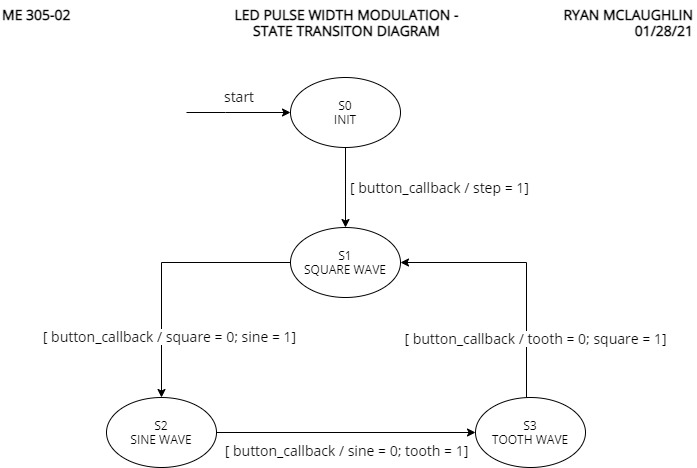
In our first lab using hardware, the goal was to learn about interupt callbacks, pulse width modulation, and some other key basic concepts for working with the Nucleo board. This program allows the user to cycle through three different patterns (square, sine, and sawtooth) simply by presing the blue button on the Nucleo board. Included below are more details regarding source code, the general finite state machine implemented, and user defined functions.
See source code here: https://bitbucket.org/ryanmclaug/me_305/src/master/Lab0x02/ledpwm.py
See demo video here: https://youtu.be/7zcb3uxbQ7k
| def ledpwm.onButtonPressFCN | ( | IRQ_src | ) |
Gives button ability to change a variable.
In order to change the state of the finite state machine, an interrupt callback is used in the form of the blue user button on the Nucleo board. When the callback function is called from the main script, the global variable button_press becomes True, and this change triggers the main script to update the state.
| IRQ_src | is |
| def ledpwm.sawtooth | ( | tdiff | ) |
Sawtooth wave pattern function.
The final waveform in the three pattern sequence is a sawtooth (or ramping) waveform. For this wave, the formula,
is employed. The modulus operator reduces the input time to a vavlue between 0 and 1 (discluding 1), which can then be multiplied by 100 to get a correct brightness value.
| tdiff | Calculated in the main script, this is the time elapsed since the button was last pressed. The same input parameter is used for each of the three functions, and is calculated using a combination of utime.ticks_ms() and utime.ticks_diff(). |
| def ledpwm.sine | ( | tdiff | ) |
Sine wave pattern function.
The second waveform shown on the LED is a shifted sine wave. For this wave, the formula,
is employed. Since a sine wave is inherently continuous in nature, operators are not needed in this function to modify the input time value. This wave has an amplitude of 50 (to oscillate between 0% and 100%) and is shifted upward to begin at 50% brightness.
| tdiff | See the above function sine() for a full description of tdiff |
| def ledpwm.square | ( | tdiff | ) |
Square wave pattern function.
The first of three pulsing waveforms is the classic square wave. For this wave, the formula,
is employed. The modulus operator reduces the input to a value between 0 and 1 (discluding 1), followed by a comparision with 0.5. With this, the LED will switch between on and off every half second.
| tdiff | See the above function sine() for a full description of tdiff |
| bool ledpwm.button_press = False |
Boolean variable to define if the button is pressed.
When the button has been pressed, the callback function is implemented to change button_press to True. This variable therefore defines when to switch states.
| ledpwm.ButtonInt |
| ledpwm.pinA5 = pyb.Pin (pyb.Pin.cpu.A5) |
Pin variable for LED.
Similar to pinC13, but for the output LED.
| ledpwm.pinC13 = pyb.Pin (pyb.Pin.cpu.C13) |
Pin variable for blue user button.
The blue button on the board serves as the main user input interface, and therefore needs a pin assignment.
| int ledpwm.state = 0 |
Boolean variable to define if the button is pressed.
When the button has been pressed, the callback function is implemented to change button_press to True. This variable therefore defines when to switch states.
| ledpwm.t0 = utime.ticks_ms() |
Starts timer zero point.
To later calculate time elapsed since a state has been entered, a timer needs to start running.
| float ledpwm.td = 0.001*utime.ticks_diff(utime.ticks_ms(),t0) |
Time elapsed since last button press.
Since each pattern function is based on time, td is passed through to the correct function, and is used to calculate what brightness level the LED should be set to.
| ledpwm.tim2 = pyb.Timer(2, freq = 20000) |
Pin variable for pyb timer.
To use pulse width modulation of the LED, we need a timer.
 1.9.0
1.9.0